
Google’s Find Hub
Google LLCTools
4.240.34K Reviews
- Version
- Varies With Device
- Installs
- 1.00B
- Age Rating
- Everyone
Screenshots
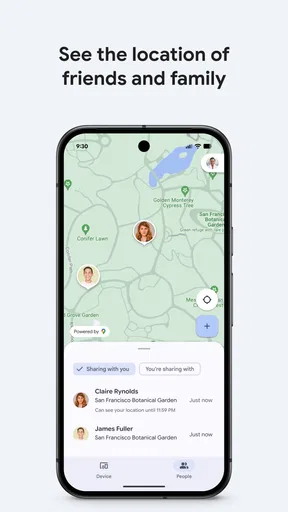
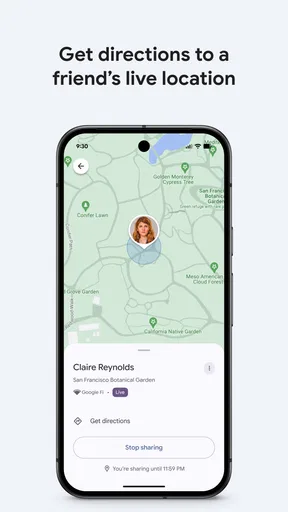
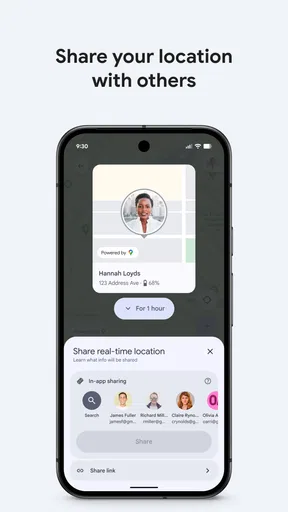
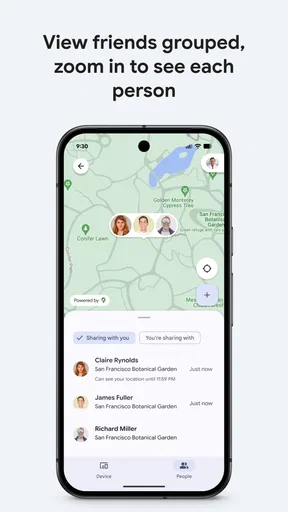
Our Review of Google’s Find Hub
 Analysis by Appyee
In the first few days with Google's Find Hub, the appeal is easy to understand: it gives you one place to check when a device goes missing. That convenience is most noticeable when you are already stressed and short on time. I like that the app is aimed at solving a practical problem, rather than asking me to build a complicated tracking routine before it becomes useful.
When one quick check is enough
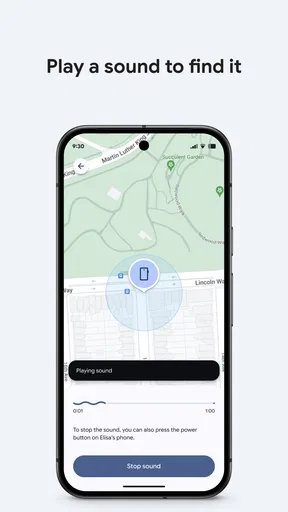
Imagine leaving home in a rush and wondering whether your tablet is still at a friend’s place or slipped into a bag. Opening the app to check its location can narrow down the search before you start retracing every step. For a misplaced phone nearby, making it ring is more useful than staring at a map and guessing which room it is in.
That difference matters: a location view helps with objects that may be elsewhere, while a sound helps when the device is close but hidden. I would treat these as complementary ways to search, not as a guarantee that every lost item can be recovered. A map can point you in a useful direction; it cannot tell you whether the device is under a cushion or in someone else’s hands.
Who benefits most from having it ready
I see the strongest case for people who already use several Android devices tied to a Google account and want a familiar starting point when one goes missing. It can also be reassuring for someone who regularly leaves a phone or tablet behind at work, at a friend’s home, or in a shared space. Setting it up before a stressful moment is the sensible move; a recovery tool is less helpful if you only think about it after something disappears.
On the other hand, if you rarely misplace devices and do not want another app connected to your account, the benefit may feel modest. Someone looking for a dedicated family-location service should also think carefully about whether this is the right fit: finding devices and sharing location are useful capabilities, but they are not the same as a full family coordination routine. I would choose a tool based on the job I actually need done, rather than assume one app covers every kind of tracking.
A useful distinction between a device and a person
It helps to decide what you are trying to locate before opening the app. If it is your own phone, a ring or remote lock addresses a direct device problem. If you are checking a shared location, that involves another person and calls for clear agreement about when and why location sharing is useful. Keeping those tasks separate makes the app feel more purposeful and helps avoid treating someone’s location as just another item on a map.
For a household, I would talk through the practical boundaries first: who is sharing, with whom, and whether the arrangement is for everyday coordination or occasional reassurance. That conversation is more important than any map screen. Location tools work best when everyone understands the purpose; they are a poor substitute for trust or a direct message.
What Exactly is Google's Find Hub?
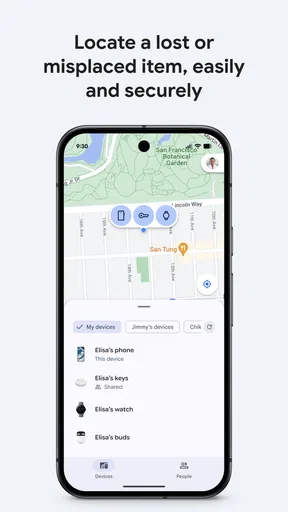
Alright, imagine this: You’re late for work and, as usual, your phone is playing hide-and-seek. Enter Google's Find Hub. It’s basically an all-in-one solution designed to locate your devices, whether it’s your phone, tablet, or even your smartwatch. The beauty of this app is its simplicity. You log in with your Google account, and voilà, all your connected devices are right there at your fingertips.
Setting Up Your Hub
Getting started with the app is a breeze. Once you’ve installed it, signing in with your Google account is the first step. The app automatically syncs with your devices linked to the same account. No need to manually add them, which is a huge time-saver. Plus, the interface is clean and intuitive, so even if you’re not a tech wizard, you’ll feel right at home.
Features That Make It Stand Out
One of the standout features is the real-time location tracking. You can see where all your devices are on a map, which is super handy if you’ve left something at the coffee shop. And if your phone is hiding somewhere in your house, you can make it ring at full volume even if it’s on silent. Trust me, it’s a life-saver when your phone decides to play ninja.
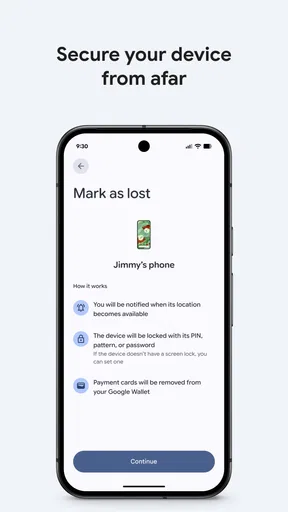
Another nifty feature is the ability to lock your device remotely. So, if you think your device has been stolen, you can lock it and display a message with your contact info. This feature gives you a little peace of mind knowing your data is safe.
Integration with Other Devices
The app shines when it comes to integrating with other devices. It’s not just limited to phones and tablets; you can also manage Android Wear and even some smart home devices. It’s like having a universal remote for your tech life.
And let’s not forget about the battery-saving tips. The app gives you suggestions on how to optimize battery life, which is a small but appreciated touch, especially if you’re constantly on the go.
My Personal Experience
Now, I’ve been using Google's Find Hub for a few weeks, and it’s honestly become an essential tool in my daily routine. Last week, I left my tablet at a friend’s house and didn’t even realize it until I checked the app. A quick glance at the map, and crisis averted.
There was also this one time when I thought I lost my phone at the gym. I used the app to make it ring, and it turned out it was wedged between the car seats. It’s these little conveniences that make this app a must-have.
From the first week to the routine
The first successful search can make the app feel indispensable, but I judge a utility by whether it still earns attention once the novelty has worn off. For me, its recurring value is quieter: I do not need to open it every day. It is useful precisely because it can sit in the background until a device is misplaced, then offer a focused place to begin looking.
That low-frequency pattern is both a strength and a limitation. Someone who expects a daily dashboard or a reason to check in will probably find little to do here during ordinary weeks. Someone who wants a dependable fallback may appreciate that the app does not need to become a hobby. I would make sure the account and devices are in order, then let the tool be uneventful until it is needed.
Small habits that make a search less stressful
A practical habit is to check that the devices you care about appear in the app before you leave them behind. That quick check is more useful than discovering a missing device is not available to locate when you are already away from home. I would also decide in advance what I would do if a device appeared to be somewhere unfamiliar: try a reasonable check first, then use the remote lock option if the situation points to a security concern.
It is worth keeping expectations grounded. Location information is a lead, not a forensic report, and an unfamiliar location does not automatically prove theft. A device could have been left in a vehicle, at a workplace, or with someone who is trying to return it. I would avoid confronting anyone based only on a map and focus first on protecting the device and personal information.
How it compares with the usual alternatives
Compared with searching manually, the benefit is obvious: the app can tell you where to start and can make a nearby phone ring instead of asking you to remember every place you set it down. Compared with a separate tracking service, its appeal is that it is a Google tool for devices connected to the same account. That makes it a natural first stop for people already using that setup, but not necessarily the best answer for every household or every type of item.
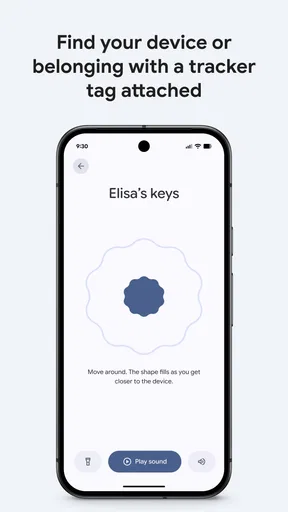
If your main goal is coordinating with family members, a dedicated location-sharing service may suit your routine better, especially if you want features centered on communication rather than device recovery. If you mainly lose small belongings, a compatible item tracker may be a better fit than relying on a phone-focused workflow. I would not replace a tool that already works well for those specific needs just because this app has a broader name.
The trade-off is simplicity versus specialization. Find Hub is most compelling when the missing thing is a device you have already connected to your Google account. It is less compelling when you need a different ecosystem, detailed household planning, or a tracking method for objects that are not part of your device setup. Knowing that boundary makes it easier to judge whether it deserves a place on your phone.
What to expect when a device is missing
If a device is at home, ringing it is often the quickest test. If it may be somewhere outside your home, I would look at the map, think through the last time I had it, and use the location as a starting point for a calm search. If I suspect someone else has it, remote locking can be a sensible protective step. These are different situations, so it helps to choose the response rather than repeatedly refreshing the map without a plan.
People often wonder whether the app is only for emergencies. I do not think it needs to be. It can help with an ordinary lost-phone moment, but there is little reason to keep checking it when everything is where it should be. It is also more useful when the devices you care about are linked to the account you use to sign in, so I would confirm that setup while you still have access to them.
Where the convenience has limits
There is a privacy trade-off in any service that brings device locations and shared locations together. I would be deliberate about account access and about who is included in location sharing, rather than enabling sharing casually and forgetting about it. The app’s usefulness should not come at the cost of unclear expectations between friends or family.
There is also a practical difference between locating a device and recovering it. A location can help you decide whether to search the office, call a friend, or secure the device, but it cannot guarantee that you will get the hardware back. For a suspected theft, I would prioritize protecting access and use appropriate local channels instead of treating the app as a substitute for them.
As a tools app from Google LLC, Find Hub is free and rated for everyone. It has a 4.2 average from around 1.6 million ratings, and it has been installed over a billion times. Those figures suggest that it has broad reach, but they do not tell me whether it suits a particular person. The useful question is whether its device-finding role matches the way you use your phone and other connected devices.
Final Thoughts
In a world where we’re juggling multiple devices, Google's Find Hub is a game-changer. It’s easy to use, integrates seamlessly with your Google account, and has a bunch of features that genuinely make life easier. Whether you’re prone to losing your gadgets or just want an extra layer of security, this app is worth checking out.
So, what are you waiting for? Give it a try and let me know if it saves your tech day as it did mine!
Does it earn lasting space?
For my long-term verdict, I would keep it installed if I used Android devices tied to a Google account, because a recovery tool is most valuable when it is ready before a problem starts. The maintenance burden seems light in everyday use: the main job is to keep the relevant devices associated with the account and to be thoughtful about any location sharing. It is not an app I need to open on a schedule.
The friction is more about expectation than upkeep. If you want a detailed family organizer, a dedicated tracker for every kind of possession, or a service built around frequent social check-ins, this would not be my first choice. If you want a straightforward place to look when a connected device goes missing, it earns its space through occasional, practical usefulness rather than constant engagement.
That is why I would recommend it selectively, not automatically. For a person who has already lost time searching the house for a phone or retracing a route for a tablet, having this ready is sensible. For someone with a different ecosystem or no real need to locate devices, there is no reason to install another tool just for the novelty. Its best quality is that, when the routine breaks, it gives you a clear first step.
Privacy and Permissions
See what permissions an app requests and how it handles your data.
- Identity
- find accounts on the device, add or remove accounts
- Contacts
- find accounts on the device, read your contacts
- Location
- approximate location (network-based), precise location (GPS and network-based)
- Camera
- take pictures and videos
- Other
- view network connections, pair with Bluetooth devices, access Bluetooth settings, measure app storage space, full network access, run at startup, use accounts on the device, prevent device from sleeping, modify system settings, read Google service configuration
Verdict
Strengths of Google’s Find Hub
- User-friendly interface enhances accessibility.
- Real-time location tracking is highly accurate.
- Seamless integration with Google devices.
- Battery usage is optimized for efficiency.
- Customizable alerts for specific locations.
Limitations of Google’s Find Hub
- Limited to Google ecosystem compatibility.
- Some features require a stable internet connection.
- Occasional delays in location updates.
- Privacy concerns for continuous tracking.
- No offline mode available for remote areas.
Other Releases by Google LLC
View All
Google Calendar
Productivity4.6

Google Messages
Communication4.6

Tools4.0

Google TV
Video Players & Editors3.9
Similar Picks in This Category
View AllGoogle LLC4.0

Gboard - the Google Keyboard
Google LLC4.5

Google Play services
Google LLC4.3

Google Play Store
Google LLC4.9

Files by Google
Google LLC4.5

SHAREit: Transfer, Share Files
Smart Media4U Technology Pte.Ltd.4.3
You May Also Like
View All
Frequently Asked Questions
What is Google’s Find Hub and how does it work?
Google’s Find Hub is an app designed to help you locate your lost or misplaced Android devices. It works by connecting to your Google account, allowing you to track your device's location in real-time. Additionally, it offers features such as remote locking and erasing data to protect your information.
Is Google’s Find Hub free to use?
Yes, Google’s Find Hub is completely free to use. It is a part of Google's suite of services and does not require any subscription fees. However, it does require an active Google account and internet connectivity to function effectively.
What devices are compatible with Google’s Find Hub?
Google’s Find Hub is compatible with most Android devices, including smartphones and tablets running Android version 4.0 and above. It is also accessible via the web, allowing you to track your device from any internet-connected computer.
Can I use Google’s Find Hub to locate my device if it’s turned off?
Unfortunately, Google’s Find Hub cannot locate a device that is turned off or has a depleted battery. It requires the device to be on and connected to the internet to provide real-time location updates. However, it can show the last known location before the device was turned off.
How secure is my data with Google’s Find Hub?
Google’s Find Hub is designed with privacy and security in mind. It only uses your device's location data for tracking purposes and allows you to manage your privacy settings. Additionally, features like remote locking and data wiping ensure your information remains secure if your device is lost.
